
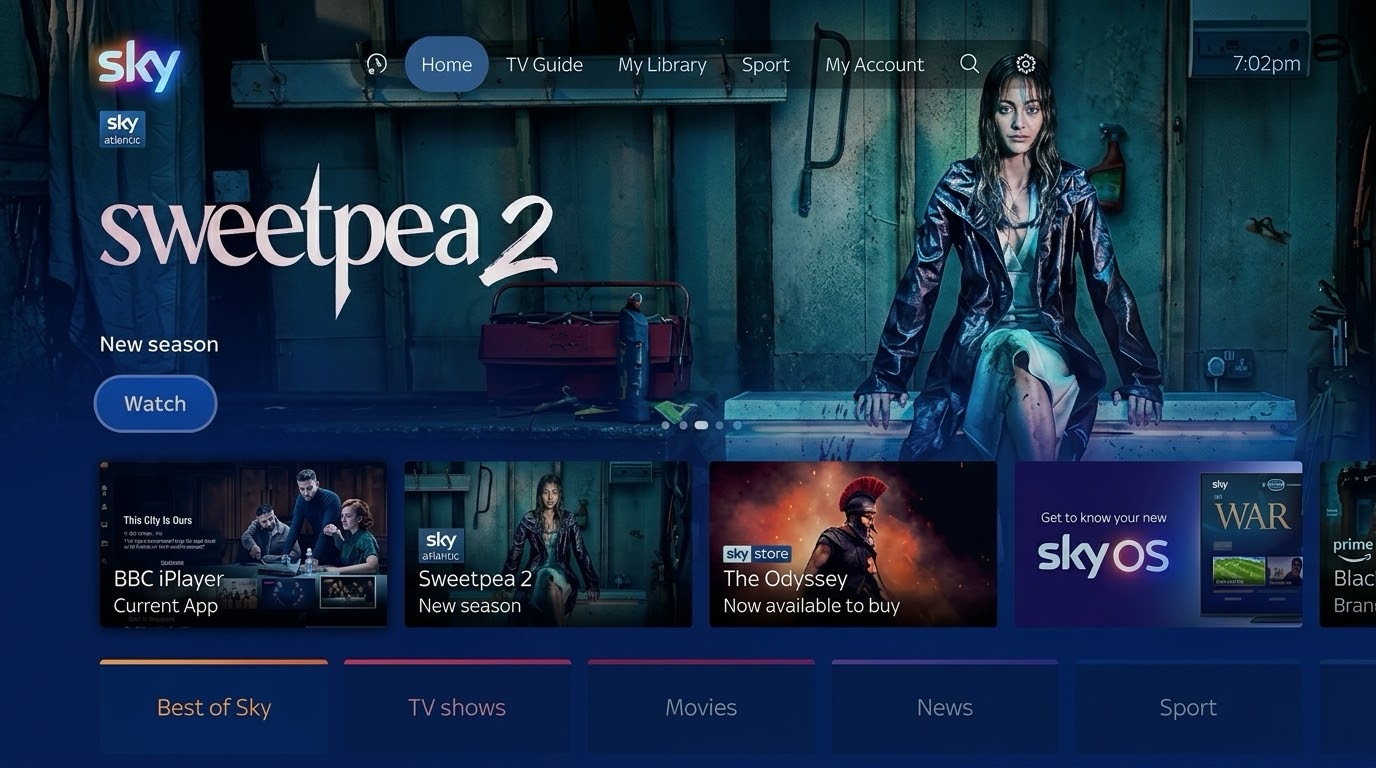


Having been a Sky Stream user since March 2025 (and a Sky Q user prior to that), I was looking forward to the new 2.0 Sky software and functionality for Stream and Glass. My box and software had become laggy, and some decent new features were long overdue. Here is a breakdown of my thoughts on the biggest Sky Stream and Sky Glass changes currently rolling out.

User Interface, Navigation & Recents
Booting up the puck feels slightly faster, and navigating the user interface is noticeably smoother. It isn’t ground-breaking, as the core screens remain familiar, but the main Home screen now features a top menu bar letting you jump straight to Recents, TV Guide, and My Library (which houses your watchlist items and recordings) and other areas).

The Recents section is particularly handy for picking up where you left off. It is a useful additional tab, combining a Continue Watching rail alongside recently viewed channels, recent apps, and recently watched shows.
In several places, the new software gives you multiple routes to reach the same feature. Apps, for instance, can be accessed via Recents, the main Home screen, or even the Account tab.
Online feedback has been mixed from users. While some seem to like the general direction the software is heading, many (myself included) feel that more customisation options are needed. Being able to swap out the tabs on the new top menu bar would be a great start. Not everyone wants a dedicated Sport tab; plenty of us would prefer the option to replace it with Cinema, News, or something else we actually use.
There are enough changes to create a small learning curve for most users and a period of adjustment, and reaching certain features now requires additional clicks for some functions. This has led to plenty of complaints on Sky’s forums about extra button clicks just to get to everyday essentials. Thankfully, if you ever get lost deep in a sub-menu, a quick press of the Home button takes you straight back to the main screen.
My Library & Cloud Recording
Recording has finally arrived, at least partially. Because Sky Stream pucks and Sky Glass TVs don’t have internal hard drives, Sky has implemented cloud recording, though it isn’t available across every broadcaster. Sky channels, Channel 4, and Channel 5 allow recordings to be set, whereas channels like the BBC and ITV still rely on adding shows to your watchlist and launching them via their respective catch-up apps.
From what I’ve seen so far, the recording function works well. To test it, I pressed record while Terminator 2 was already airing in Ultra HD on Sky One. I wondered whether it would even let me record the film as some will know, adding a Sky One movie to your watchlist previously redirected you to Sky Cinema, which only worked if you had a Cinema subscription. I also wondered if the recording would appear instantly and, being cloud-based, pull the film from the very beginning.
It did appear in my library immediately, though interestingly, playback only started from the exact point I pressed record. So despite living in the cloud, it behaves very much like a traditional DVR. Another welcome improvement is turnaround time: previously, certain shows (on Channel 4, for example) wouldn’t always appear on catch-up right after a live broadcast ended. Now, if you record them, you can watch as soon as you’re ready.
It is a shame that cloud recording isn’t supported across all channels, almost certainly down to broadcaster permissions and licensing which makes the overall experience feel a little inconsistent. For those with Ultra HD enabled, you can record in 4K when available. You get 1,000 hours of storage, though recordings do appear to have a retention limit (understood to be one year). Hopefully, Sky will offer storage enhancements in the future though I am sure that would be bolt ins that you pay for knowing Sky.

One oddity you’ll notice immediately after updating is that your cloud library is already full of “recordings.” This happens because the update lets content Sky had previously saved behind the scenes for your old Playlist and Watchlist items before exposing a dedicated Recordings tab. Clearing them out via the settings took me an age. At the bottom of the Library page, you’ll also find options to manage your watchlist, manage recordings, and switch watchlists.
Voice Control
Voice control has clearly had an upgrade. I tested it by searching for actors and opening apps like YouTube, and overall it feels much sharper with a better grasp of natural requests. It isn’t flawless but generally okay. When I searched for “Tom Cruise films in the jungle,” it returned an accurate result, and broader prompts like “display some film recommendations” worked well too. I’m still experimenting with it, but deeper searches are definitely improved.

TV Guide
When switching on Sky Stream, live TV now starts playing immediately, though you can disable this in the settings if you prefer. The TV Guide itself looks familiar when you access and you get a small window in the bottom right playing the channel that you are viewing.
A few handy navigation tweaks:
1. Long-pressing the Back button toggles between the guide and whatever you’re currently watching, keeping a reduced screen on the guide.
2. Pressing Select while watching live TV brings up a redesigned playback control interface.
3. Pressing right when viewing TV opens an improved mini-guide showing other channels alongside Now & Next. I quite like this new display.
4. Arrow down once (or press the TV Guide button again) while in the TV guide to bring up channel filters, including your Favourites.
It should be noted though that some forum users have pointed out that getting to Favourites and Now & Next still feels like more clicks than it used to be. I would tend to agree but guess just a matter of getting used to it.

Sport
For sports fans, there is now a dedicated Sport page accessible right from the top menu. Again, as someone with zero interest in sport, I’d love the ability to hide or replace this tab with something more relevant to me.

Account & Settings
The Account page looks clean enough, though it isn’t ground-breaking and like the Sport tab, I’d gladly see it tucked away in favour of a customisable shortcut.

Settings-wise, options feel limited, and several useful controls seem to be missing. Editing watchlists is slow and cumbersome, and I couldn’t find the previous eco settings anywhere. The screensaver also still appears to run for only a short window before putting the box into standby. That’s a shame.

Overall Verdict
Sky continues to course-correct and iron out long-standing frustrations. Between recently announced included apps, the return of Sky One, and now these OS 2.0 improvements across Stream and Glass, it does feel like Sky is listening to feedback.
While wider community reports have highlighted a few teething troubles – such as extra clicks to reach favourite channels, difficulty clearing stubborn items from Continue Watching, and occasional lag or black-screen glitches on older pucks, my experience has been largely positive. Some users also reported YouTube playback issues after updating; I use YouTube heavily and haven’t hit any problems, though my puck received the rollout slightly later than some, so Sky or Google may have already patched it.
Hopefully, OS 2.0 is just the beginning and top-menu customisation is near the top of Sky’s next to-do list.







Leave a Reply